01 · Enterprise AI · 2025 to Now
Microsoft Learning Agent
I am the UX and evidence engine behind Microsoft's shift from static platform learning to AI-enabled, in-flow, agentic skilling. I design the experience and build the systems that prove it is working.
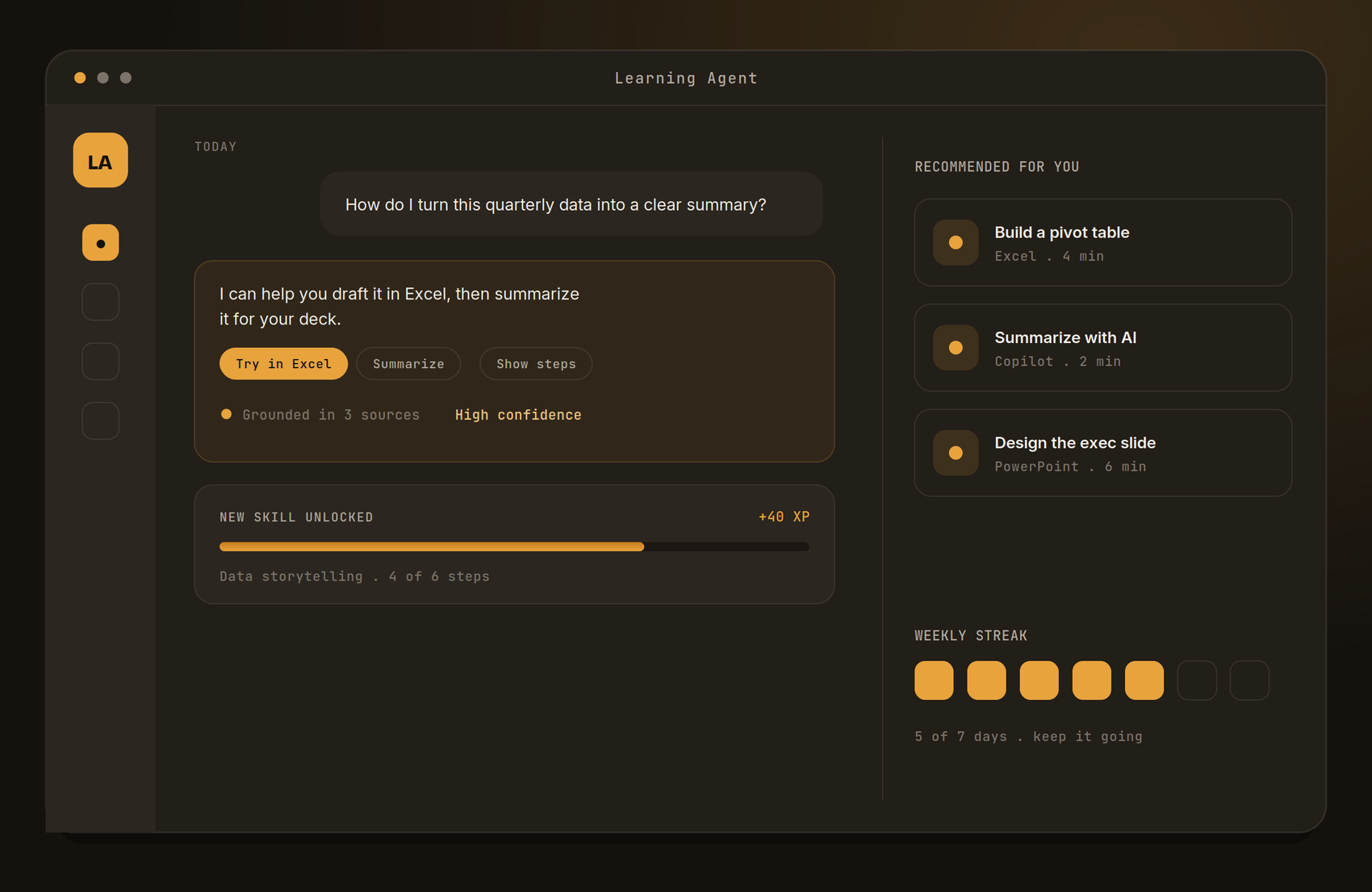
A look at the Learning Agent experience: conversational guidance, grounded answers with confidence, and progress that compounds. Interface is representative and built for this portfolio.
Reskilling is the product. AI is the medium.
Millions of people now have powerful AI sitting next to their work. Most have no idea what to ask it, when to trust it, or how to fold it into how they already work. My job is to change that, at Microsoft's scale.
I joined Microsoft in November 2025 as Sr. UX Skilling Lead in Workforce Acceleration, embedded in Global Learning & Skilling. My work spans four connected fronts: running and synthesizing the Learning Agent (AiLA) pilots, building the research and evaluation systems that make those pilots credible, authoring the experience standards that let AI deliver skilling at scale, and co-designing the Inside AI Signature Experience.
The through-line is a single operating principle I apply relentlessly: move AI learning from subjective opinion to evidence-based decisions, and from "training" to measurably redesigned work.
4Pilot cohorts synthesized
34Survey responses analyzed
16Interviews & focus groups
51In-product ratings reviewed
82%Resource click-through (top metric)
68%Est. win rate vs Copilot
Cohort counts and scorecard percentages are measured. The 68% win rate is an early estimate (target 85%), not a final result.
Capability went up. Confidence did not.
Enterprises rolled out AI faster than people learned to use it. The tools became dramatically more capable, but most people still default to the old way of working because the new way is unfamiliar and a little intimidating.
Traditional learning makes this worse. Pulling someone out of their work into a separate course is the wrong shape for a skill that only makes sense in context. The challenge is designing learning that happens where the work happens, at the scale and standard Microsoft 365 demands.
The hard part is behavior, not features.
People do not know where AI helps. The blank prompt is paralyzing. Opportunity is invisible until someone points to it in context.
Learning pulls people out of work. Courses and docs sit far from the moment of need, so adoption stays low even when the content is good.
Trust breaks on a black box. When an answer cannot be checked, people either over-trust it or abandon it entirely.
"Why not just use Copilot?" The Learning Agent has to prove its value over the general-purpose tool people already have.
Enterprise scale. The experience has to hold across many M365 surfaces and a global, varied workforce.
Proof, not opinion. At this scale, leadership needs evidence that design changes behavior. Assertions are not enough.
The challenge
Move AI learning from subjective opinion to evidence-based decisions, and from "training" to measurably redesigned work, at Microsoft's scale.
Three rules I lead every decision against.
01
Teach in the flow
Learning meets people inside the task, at the moment of need, not in a separate destination they have to find.
02
Earn trust
Make AI outputs checkable. Show what an answer is grounded in and how confident the system is, so trust is built, not assumed.
03
Redesign the work
Aim past one task. Rebuild the workflow so the human keeps judgment and the agent takes the toil. Instrument before and after.
Four cohorts, one decision-ready evidence base.
I designed, ran, and synthesized the UX research program behind the AiLA pilot, then converted a large, messy evidence base into a single prioritized set of engineering and product recommendations, the artifact the product team works from.
I pooled data from four cohorts, Azure Boot Camp, WFA UAT, CO+I, and Finance, into one comparable dataset. I measured nine survey dimensions on a 1-5 scale and coded every transcript across six qualitative themes. I validated survey claims against in-product behavior using 51 thumbs ratings (75% positive across 18 unique users) tracked separately from the surveys, applying a minimum three-signal rule: behavioral plus survey plus qualitative before any recommendation became actionable.
The output was seven prioritized recommendations, three P0 "must-fix," two P1 "high-impact," two P2 "refinement," each structured as observation to problem to impact to solution, with a NOW / NEXT / LATER sequencing plan for engineering. Specific, reproducible issues, like a manager-to-new-joiner link-sharing bug surfaced in the June 8 Finance focus group, came with named user evidence and were handed off directly to the product team.
Why it mattered
Four disconnected pilots became one decision-ready evidence base. Pinpointed the two weakest levers, reuse intent at 44% and value vs. Copilot at 47%, and sequenced fixes by signal strength and engineering tractability, not opinion.
The numbers, honestly labeled.
The table below is the actual AiLA program scorecard I produced, pooled top-2-box from pilot data across four cohorts. I label evidence types rather than presenting all figures as uniform results, because that is what makes the data defensible to leadership.
| Dimension | Score | Status | Read |
|---|---|---|---|
| Resource click-through | 82% | On track | Front-end doing its job. Top metric. |
| Usability, first attempt | 71% | On track | Usable without instruction. |
| Relevant & actionable | 68% | Watch | Closest to green. Improving sprint over sprint. |
| Trust in sourcing | 62% | Watch | Up from 55% pre-Finance cohort. |
| Focused & helpful content | 62% | Watch | Strong qualitative praise alongside this score. |
| Value vs. Copilot | 47% | Watch | The differentiation question. Key focus area. |
| Likelihood to reuse | 44% | Watch | The trailing indicator to move. Tied to value. |
| Resource match | 44% | Watch | Resources reach users but miss depth. |
All figures are measured, pooled top-2-box from pilot data. Green threshold: ≥70%. Amber: below threshold, actively addressed.
Turning "why not just use Copilot?" into a number.
The hardest question the product faced was whether the Learning Agent was actually better than the general AI tool people already had. To answer it with evidence rather than opinion, I built a blind, side-by-side testing framework that converts AI response quality from subjective feedback into quantified, defensible signal.
- Identical learning scenarios sent to both AiLA and Copilot, displayed without system labels to eliminate brand bias.
- Four scoring dimensions: clarity, relevance, actionability, and trust, capturing why one response wins, not just which one, before a comparative preference decision.
- Failure-pattern tolerance set at under 10% unacceptable responses and a standalone sentiment target of at least 75% positive.
Early signal (estimate, target 85%)
The Learning Agent shows an estimated 68% win rate in blind comparison to Copilot, strongest in actionability and grounding. The framework itself already shaped product direction, identifying Viva Learning content gaps that led to a new partnership model.
I designed the framework to be repeatable and scalable across future AI experiences beyond AiLA, so its value compounds as new products enter evaluation.
The defining decision: destination or flow.
Early in the project the team faced a fork. Build a rich learning destination people visit, or weave learning into the surfaces people already use. I prototyped both and pushed hard for the second.
Option A · Learning hub
A place you go to learn
- Easy to build and merchandise content
- Familiar course-catalog mental model
- Far from the moment of need
- Competes with real work for attention
- Skills do not transfer back to the task
Option B · In-flow guidance · chosen
Learning where the work is
- Meets people at the moment of need
- Skills land in the actual workflow
- No context switch, far higher relevance
- Harder to design, must respect each host surface
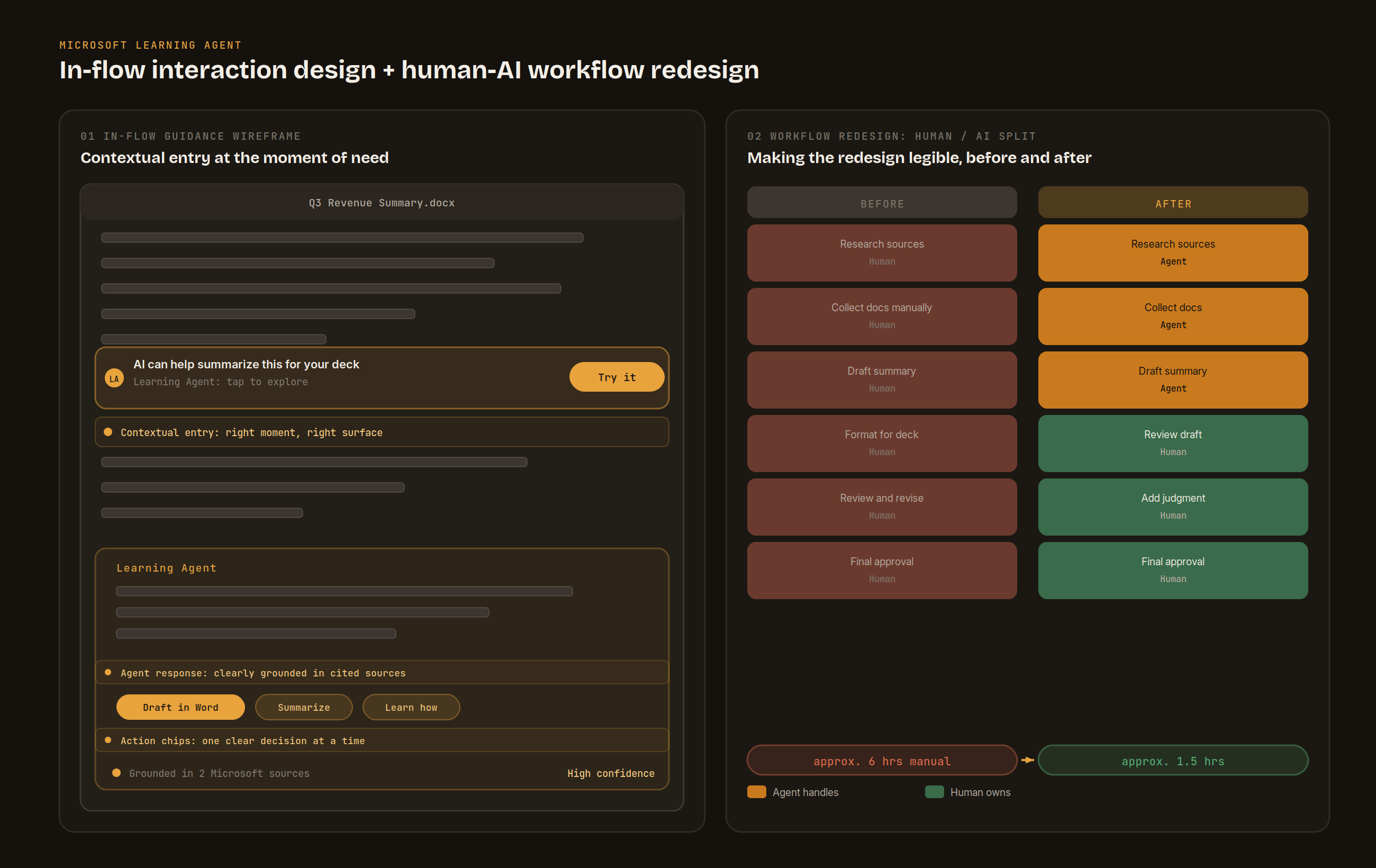
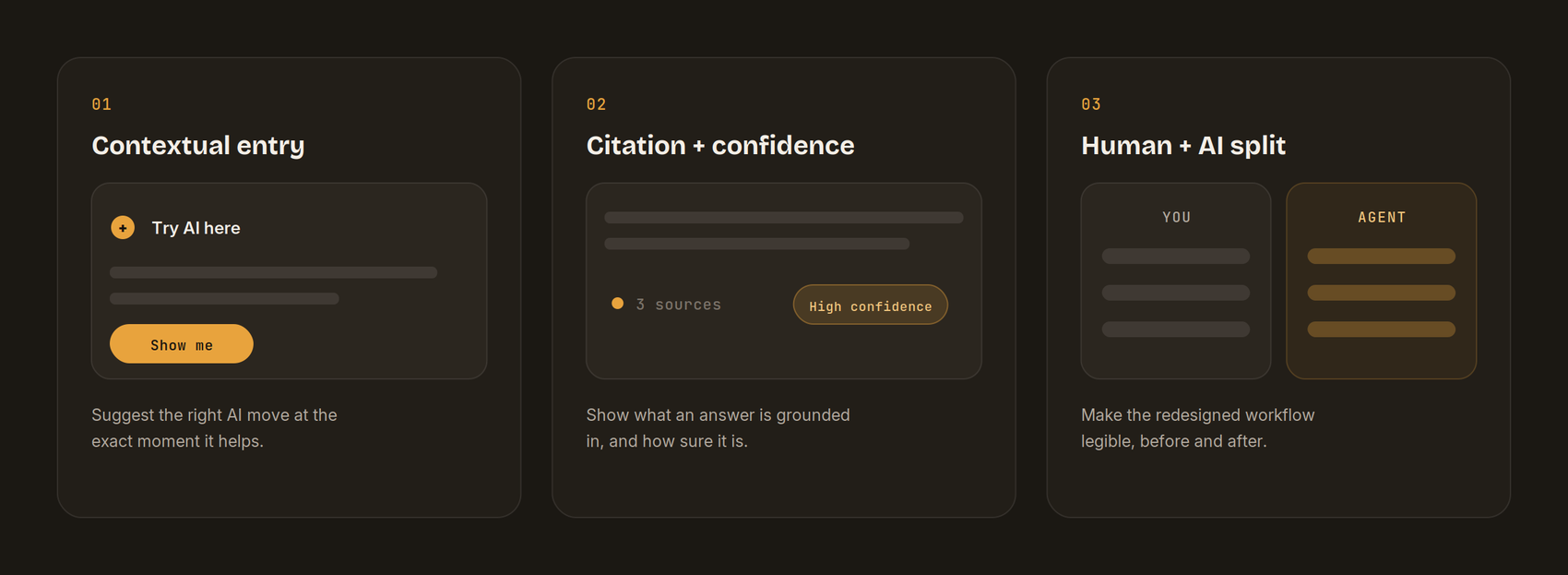
The in-flow direction shaped every pattern that followed. I defined the core interaction models: contextual entry prompts that surface the right AI move at the moment it is useful, citation chips with confidence signals that make answers checkable, and a human-and-AI task split that makes the redesigned workflow legible before and after.
Key discovery
Tips alone did not change behavior. The human-and-AI task split, showing the rebuilt workflow rather than a single trick, was what made adoption click in testing.
Decision logic for agentic skilling at scale.
I authored the standards that define the minimum experience requirements making AI-enabled and agentic skilling buildable, discoverable, and measurable. These are not guidelines. They are written as decision logic that both human designers and AI systems can follow.
An interpret-retrieve-support model that turns documentation into operational logic AI agents can act on.
Six standard categories: learning experience, accessibility & discoverability, personalization & relevance, engagement & interactivity, measurement & effectiveness, and community & connection.
Seven review-criteria decisions every experience must answer to be standards-compliant for agentic delivery: scenario, altitude of support, modality, placement in flow, safe retrieval, evidence of readiness, and trust, agency, and inclusion.
Seven modality standards from in-flow micro-support to long-form reference, with correct and incorrect examples for each, grounded in real CampAIR learnings.
The standards distinguish how they apply across upskilling, reskilling, and redeployment, making them practically usable, not just theoretically correct.
Putting Work Redesign at the center.
Within the AI Signature Experience squad, one of six squads powering Inside AI in Workforce Acceleration, I own two of the six v1 experience components and drive the blueprint that makes Work Redesign the keystone of the whole program.
Framework Integration (#04, I own): integrated the Inside AI framework around Work Redesign as the keystone, tied to a three-layer model spanning individual, team, and organization.
Experience Architecture (#03, co-driven): built the v1 spine, Enter-Redesign-Show-Spread, wired to the Work Lab kit with a worked HR example.
Work Lab kit: Work-Assessment Canvas, Redesign-to-Tool Matcher, In-Flow Prompt Library, SME Mini-Video Kit, and a Protected-Time Model.
Prototype-first method: every concept becomes a tangible artifact; the first real test is on one org's actual work; every redesign is instrumented before and after.
Illustrative proof point (to be validated in the HR pilot)
An HRBP assembling a quarterly talent-review pack, today roughly two days of manual work, is redesigned to approximately three hours: AI drafts from source signals, the HRBP curates and adds judgment. Crosses two Inside AI threshold markers. Ryan's framework feeds the HRLT deck and the HR pilot launching mid-July.
Turning practice into an organizational asset.
I codified the entire pilot process into a stakeholder-ready, reusable operating model so future waves do not start from scratch. Eighteen sections, eight phases.
Eight-phase model: frame, content-readiness gate, prompt design, measurement system, recruitment, facilitation, analysis, handoff. Each phase has defined inputs, outputs, and go/no-go criteria.
Mixed-methods measurement stack: surveys, 1:1 interviews, focus groups, UAT worksheets, in-product thumbs, and telemetry, each assigned a distinct job so no single signal is over-read.
Evidence-to-recommendation chain: observation, problem, impact, solution, priority. Minimum three-signal rule before any finding becomes a recommendation.
Reusable templates: experiment charter, content-readiness checklist, prompt bank, survey item bank, UAT worksheet, facilitation flow, and stakeholder handoff model.
The core principle I institutionalized: treat the MVP as a mixed-methods learning experiment, not a feature demo, and treat content readiness as a go/no-go gate, not a soft prerequisite.
The instrument that makes design credible.
Design at this scale is only as credible as the evidence behind it. I built and maintain the pilot dashboard that brings every signal into one place: survey scores, in-product thumbs feedback, focus-group findings, usability results, and enrollment across pilot cohorts. It uses top-two-box scoring and clear RAG status thresholds so leadership can see, at a glance, what is healthy and what needs attention.
The dashboard is how design recommendations get made and defended. It turned scattered feedback from four disconnected cohorts into a single, honest read on the program, and it is what moved the work from experimentation into scaling planning.
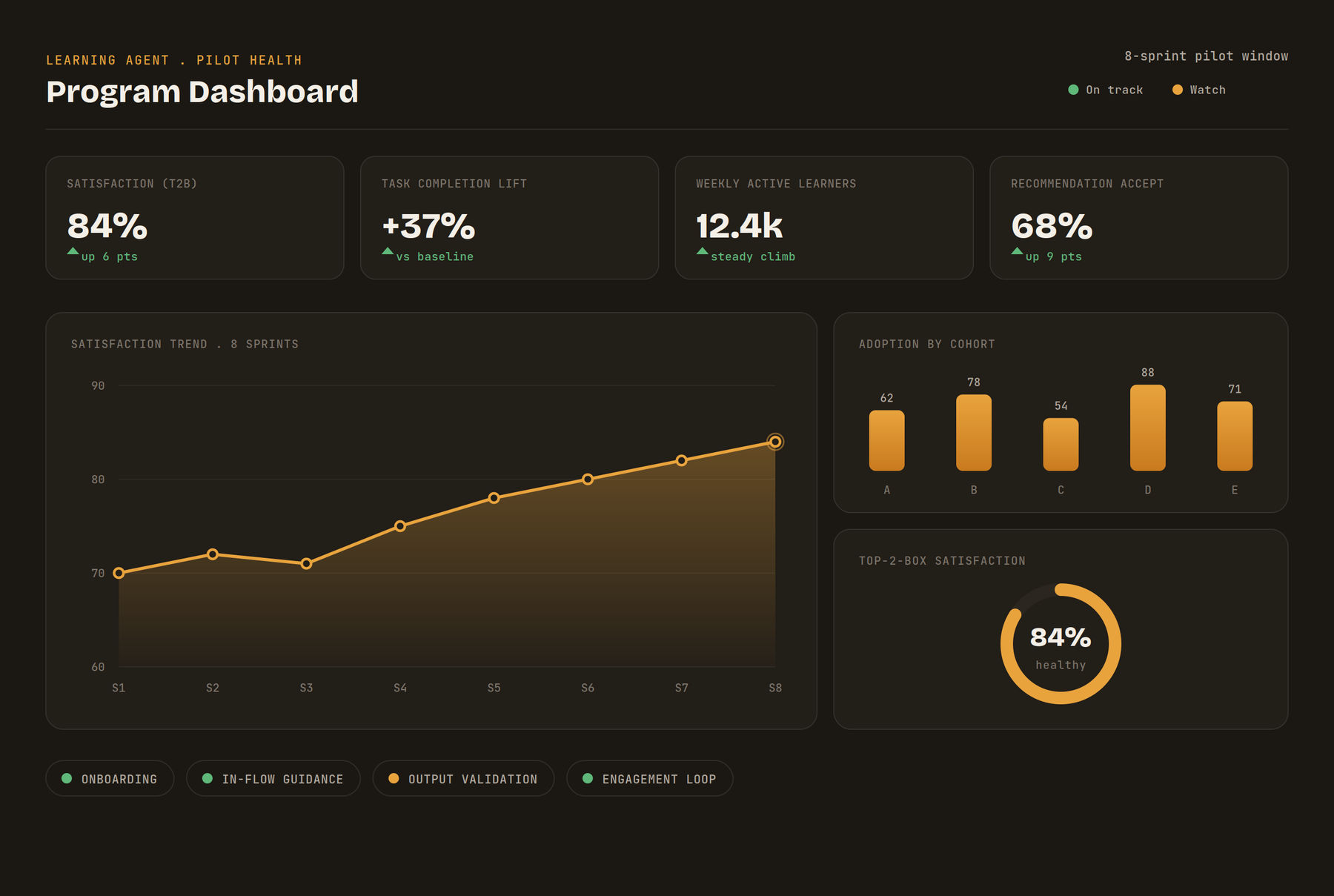
The pilot dashboard I built and maintain. Cohort labels are anonymized and dashboard figures shown here are illustrative, the live program data is internal to Microsoft.
Evidence the program can act on.
The clearest results are the ones that moved the organization forward. Six pilots complete. The work has graduated from experimentation into scaling, with CELA and HR onboarding as new cohorts. Seven prioritized product recommendations are active in the engineering backlog, sequenced by signal strength and tractability. The evaluation framework has already shaped product direction beyond the pilot, identifying Viva Learning content gaps that led to a new partnership model.
The program scorecard shows 82% resource click-through and 71% usability, both on track. The weaker signals, 44% reuse intent and 47% value vs. Copilot, are sequenced for active attention, not buried.
6Pilots complete
7Prioritized product recs in backlog
82%Resource click-through (measured)
68%Est. win rate vs Copilot
82% and pilot counts are measured. 68% win rate is an early estimate, target 85%.
What I am taking from it.
01
Frame before features
The four-pillar frame and the experience standards aligned a large, cross-functional team faster than any spec. Shared language is the highest-leverage early move.
02
Trust is a UI problem
Citation signals and grounding did more for adoption than raw model quality. People adopt what they can verify. Explainability is a feature, not a footnote.
03
Design owns the evidence
Building the measurement instrument, the dashboard, the playbook, the evaluation framework, made the design credible and moved the program forward. Proof is part of the craft.
04
Label the evidence honestly
Distinguishing measured from estimated from illustrative made the numbers defensible to leadership rather than inflated. Credibility compounds when you do not oversell.